
UNDETECTED
Byster [WARDOGS]
OUT OF STOCK
This product is completely out of stock across all regions. Please check back later or contact support.
Instant Delivery to Email & Site
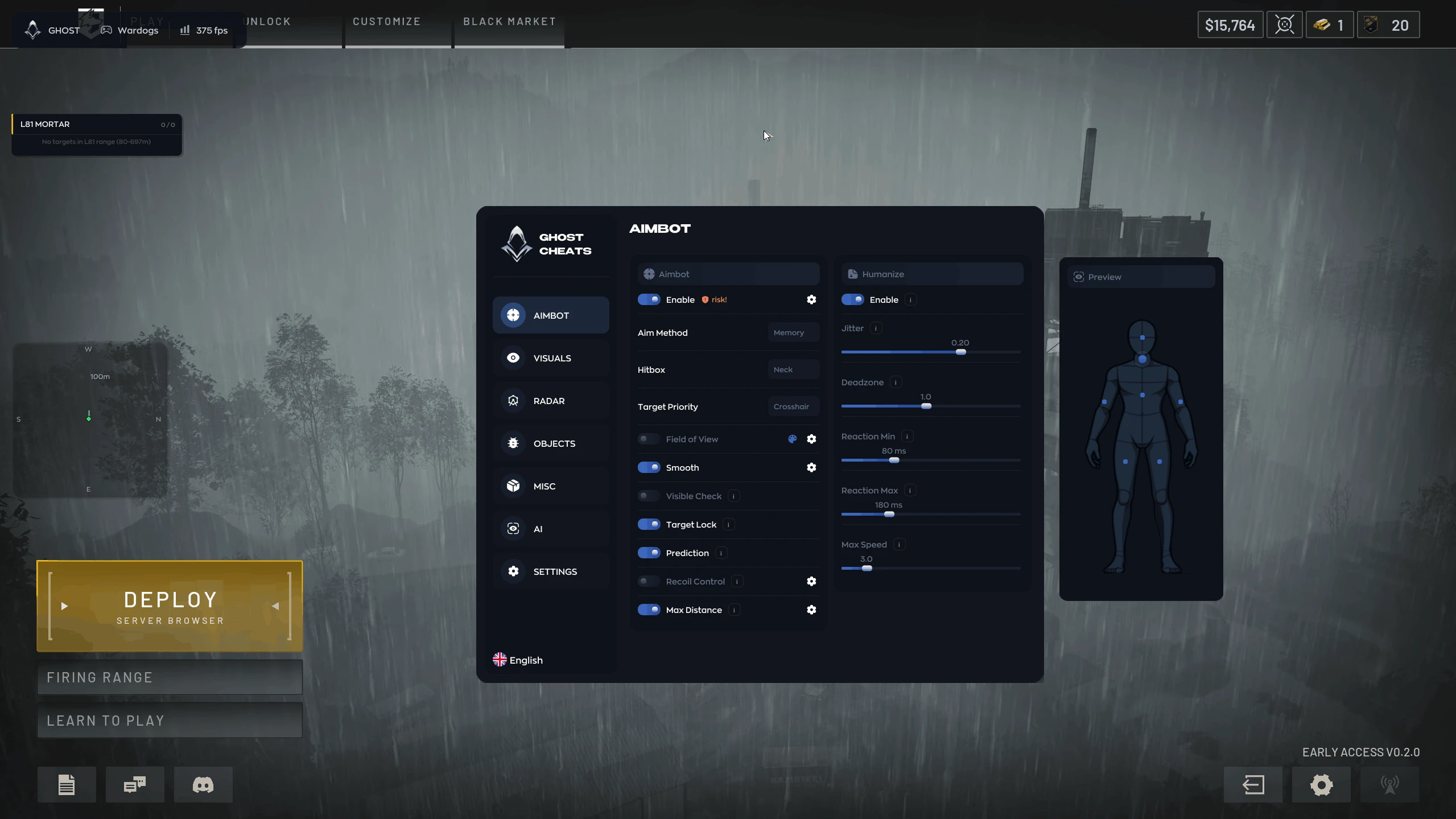
Aimbot:
- Enable – enable/disable automatic aiming at targets
- Aim Key – key to activate the aimbot (hold)
- Bones – select the body part to aim at (Head, Neck, Torso, or Pelvis)
- Bone Priority – select aiming priority (bone closest to the crosshair, random bone, or first selected)
- Aim FOV – adjust the size of the target acquisition area
- Aim Smooth – adjust aim smoothing
- Max Distance – maximum aimbot range
- Aim Lock – keeps aim locked on the selected target
- Target Switch Delay – adjust the delay before switching to another target
- Draw FOV – displays the aimbot working area on the screen
- FOV Color – customize the FOV area color
- Humanizer – makes aiming less sharp and more natural
- Humanizer Strength – adjust the strength of the "human-like" effect
- Reaction Delay – adjust the delay before aiming starts
- Sensitivity Multiplier – adjust the aimbot sensitivity multiplier
- Target Visibility Check – the aimbot only works on visible targets
- Shoot Through Walls – ignores the visibility check for shooting through obstacles
- Targets in Vehicles and Turrets – allows targeting players in vehicles and on turrets
- Aim at Vehicles – allows aiming at vehicles
- Target Movement Prediction – accounts for target movement while aiming
- Auto-Detect Bullet Speed – automatically detects bullet speed to calculate prediction
- Manual Projectile Speed – manually adjust projectile speed
- Prediction Scale – adjust the strength of target movement prediction
- Gravity Compensation – compensates for projectile drop caused by gravity
- Ignore Knocked – allows the aimbot to ignore knocked players when selecting a target
- Manual Recoil Control – adds manual recoil control settings
- Automatic Mortar Aiming – automatically aims the mortar at the selected target
Player ESP:
- Boxes – displays boxes around players in Outline, Fill, or Corners modes
- Fill Opacity – adjust box fill transparency
- Skeleton – displays the player skeleton
- Nicknames – shows player names
- Health – displays the player's health level
- Distance – shows the distance to the player
- Held Weapon – shows the weapon held by the player
- Armor Durability – displays the player's armor durability
- State – shows the player's state, including stance and injury status
- Effects and Mutations – displays the player's active effects and mutations
- Squad Marker – marks players from the same squad
- Show Teammates – displays teammates
- Visible Check – highlights players based on their visibility
- Max Render Distance – maximum player render distance
- Knocked Player Display – displays knocked players via ESP
- Off-Screen Arrows – displays directional arrows to enemies outside the screen
- Mortar / Artillery Illumination – separate illumination of mortars and artillery
- Equipment Filters – filters for gaming equipment and objects
- Equipment Icons – adds separate icons for equipment and objects
World ESP:
- Vehicles – displays vehicles
- Projectiles – displays fired projectiles and other ordnance
- Grenades and Explosives – displays grenades and explosive devices
- Interactions – displays available interactable objects
- Interaction Context – shows additional information about available interactions
- Objectives and Hot Zones – displays objectives and active hot zones
- Structures – displays buildings and other structures
- FOB Resources – displays forward operating base resources
- Names – shows object names
- Distance – shows the distance to objects
- State – displays the current state of objects
- Lines to Threats – displays lines to dangerous objects
- Active Threats Only – displays only active threats
- Enemy Threats Only – displays only enemy threats
- Per-Category Distance – separate display distance setting for each category
- Per-Category Color – separate color setting for each category
- Objective Timers – displays objective timers
- Clustering Radius – adjust the clustering radius for nearby objects
- World Object Icons – icons for convenient display of objects and equipment
Loot ESP (Items):
- Weapons – displays weapons
- Ammo – displays ammunition
- Armor – displays armor
- Backpacks – displays backpacks
- Attachments – displays modifications and attachments
- Medical – displays medical items
- Scrap – displays scrap
- Misc – displays other items
- Backpacks – adds the display of players’ backpacks
Radar Hack:
- Weapons – displays weapons
- Ammo – displays ammunition
- Armor – displays armor
- Backpacks – displays backpacks
- Attachments – displays modifications and attachments
- Medical – displays medical items
- Scrap – displays scrap
- Misc – displays other items
- Backpacks – adds the display of players’ backpacks
Exploits:
- No Sway – disables weapon sway and breathing influence
- No Recoil – disables weapon recoil
- No Spread – disables bullet spread while shooting
- Instant Scope – instantly puts the weapon into aiming mode
- No Camera Shake – disables camera shake
- Rapid Fire – increases the rate of fire
- Fire Rate – adjust the rate of fire
- Bullet Speed Override – allows changing bullet speed
- Effective Range Override – allows changing the weapon's effective range
- FOV Changer – allows you to change the field of view of the camera
- Always Crit Spot – enables faster construction by constantly selecting a vulnerable point
- FreeCam – allows you to freely move the game camera
- Infinity Breath – endless breathing while aiming
- No Weight – allows you to move at maximum load
- Grenade Prediction – shows the location of the grenade and the radius of damage
- Infinity Zoom – removes the camera zoom limit
- Auto Mini-Game – automatically plays a mini-game when reloading
- Instant Hit – instantly hits the target with a bullet
Other Byster WARDOGS Features:
- Battle Mode – hides all objects except players
- Localizations – the menu is available in English and Russian
- Search Bar – a search bar for settings directly in the cheat menu
- Menu Key – lets you assign any key to open the menu
- Configs – a separate profile system with your settings
- Mortar Assist – helps you aim the mortar correctly using the marker on the game map
- Target Font Size – allows you to manually adjust the font size for displaying targets
YOU MIGHT ALSO LIKE


REVIEWS
Reviews for Byster [WARDOGS]
Reviews are moderated before publication
No reviews yet. Be the first!